Unlock the Best Effective Content Creation Tools for Social Media Success

Creating content that truly connects with your audience can feel overwhelming. I get it. You want your message to shine clearly and confidently. The good news is, you don’t have to do it alone. With the right effective content creation tools, you can simplify your process and bring your ideas to life with ease. Let’s explore some of the best ways to unlock your creative potential and make your social media presence stand out.
Why Effective Content Creation Tools Matter
When you’re managing a brand or business, every piece of content you share is a chance to build trust and show your unique voice. But without the right tools, this can quickly become frustrating. Effective content creation tools help you:
Save time by streamlining your workflow
Enhance the quality of your visuals and messages
Stay consistent with your brand identity
Experiment with new formats and styles confidently
For example, imagine you want to create a quick, eye-catching graphic for Instagram. Instead of starting from scratch or struggling with complicated software, a user-friendly design tool can guide you through templates and easy editing options. This means you spend less time worrying about the technical side and more time focusing on your message.

Top Effective Content Creation Tools to Try Today
I’ve found that the best tools are those that feel intuitive and flexible. Here are some categories and examples that can help you create content that resonates:
1. Graphic Design Tools
Visuals are powerful. They grab attention and communicate emotions instantly. Tools like Canva or Adobe Express offer drag-and-drop features, pre-made templates, and easy customization. You don’t need to be a designer to create professional-looking posts.
Tips for using graphic design tools:
Choose templates that match your brand colors and fonts.
Use high-quality images or illustrations.
Keep text clear and concise.
Experiment with layouts but maintain consistency.
2. Video Creation and Editing
Video content is booming. Short clips, reels, and stories engage audiences in a dynamic way. Apps like InShot or Clipchamp make video editing accessible. You can trim clips, add music, insert text overlays, and more.
How to make the most of video tools:
Plan your message before filming.
Use natural lighting for better quality.
Keep videos short and focused.
Add captions for accessibility.
3. Content Planning and Scheduling
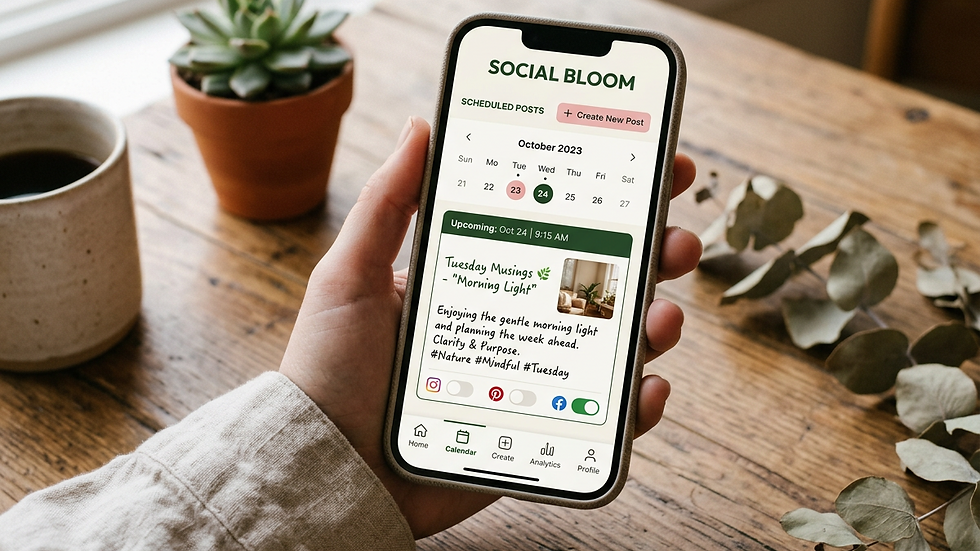
Consistency is key to building an audience. Tools like Later or Buffer help you plan your posts ahead of time and schedule them automatically. This way, you can maintain a steady flow of content without feeling overwhelmed.
Scheduling tips:
Create a content calendar to organize ideas.
Mix different types of posts (educational, promotional, personal).
Analyze engagement to find the best posting times.
How to Choose the Right Tools for You
With so many options available, it’s easy to feel lost. Here’s how I recommend narrowing down your choices:
Identify your goals: Are you focusing on visuals, videos, or written content? Knowing this helps you pick tools that fit your needs.
Consider your skill level: Start with beginner-friendly tools if you’re new, then explore more advanced options as you grow.
Test free versions: Many tools offer free trials or basic plans. Use these to get a feel before committing.
Look for integration: Tools that work well together save you time. For example, a design app that connects with your scheduling platform.
Remember, the best tool is the one you enjoy using and that supports your unique style.
Unlocking Your Creativity with Social Media Content Creation Tools
I want to share a little secret: the right social media content creation tools can transform how you approach your online presence. They don’t just make tasks easier—they inspire you to try new ideas and express yourself more fully.
For instance, using a mood board app can help you gather inspiration and keep your brand’s aesthetic consistent. Or, a caption generator might spark fresh ways to engage your audience. These tools become your creative partners, not just software.
Here’s a simple exercise to get started:
Pick one tool that feels exciting.
Set aside 15 minutes to explore its features.
Create a small piece of content—maybe a quote graphic or a short video.
Share it and notice how it feels to create with support.
This gentle approach builds confidence and helps you develop a sustainable content routine.
Making Content Creation a Joyful Habit
At the heart of it, content creation should feel rewarding, not stressful. When you have the right tools, you can focus on what matters most—sharing your message clearly and authentically.
Here are some final tips to keep your content creation joyful:
Celebrate small wins: Every post is progress.
Stay curious: Try new formats or styles regularly.
Ask for feedback: Your audience’s response guides your growth.
Take breaks: Creativity flows best when you’re rested.
By embracing effective content creation tools, you’re investing in your brand’s future. You’re choosing clarity, confidence, and connection.
I hope this guide helps you unlock the best tools for your social media journey. Remember, you have a unique story to tell, and with the right support, it will shine brightly. Keep creating, keep sharing, and watch your message reach the people who need it most.


Comments